Synchronous vs Asynchronous
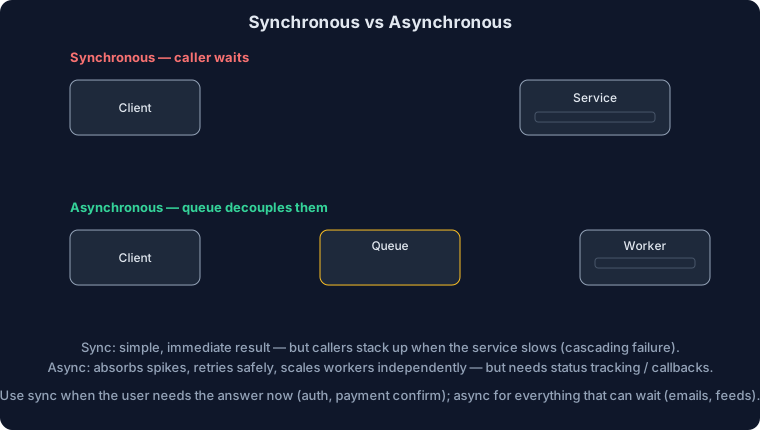
| Aspect | Synchronous (HTTP/gRPC) | Asynchronous (Message Queue) | When to Use |
|---|---|---|---|
| Coupling | Tight (caller waits) | Loose (fire and forget) | Sync: real-time; Async: decouple services |
| Latency | Low (immediate response) | Higher (eventual processing) | Sync: user-facing; Async: background jobs |
| Reliability | Retry in caller | Built-in retry, DLQ | Async for mission-critical tasks |
| Scalability | Limited (caller blocks) | High (queue absorbs spikes) | Async for traffic spikes |
Why Choose Synchronous:
- User needs immediate response (login, search)
- Simple request-response workflows
- Low latency critical
Why Choose Asynchronous:
- Long-running tasks (video transcoding)
- Decouple services for resilience
- Handle traffic spikes
Tradeoff Summary:
- Sync: Simple + Immediate ↔ Tight coupling
- Async: Decoupling + Scalability ↔ Complexity
Client Updates: Short Polling vs Long Polling vs WebSockets vs Server-Sent Events (SSE)
| Aspect | Short Polling | Long Polling | WebSockets | SSE |
|---|---|---|---|---|
| Connection Model | Client polls on interval (e.g., every 5s) | Client holds request open until data or timeout, then re-issues | Full-duplex persistent TCP (via HTTP upgrade) | One-way server → client over persistent HTTP |
| Latency | Interval-based; higher if interval large | Low; server responds immediately when data ready | Very low; bi-directional | Low; server pushes as events occur |
| Server Load | Many requests; wasted when nothing changes | Fewer requests; each may tie up a worker until data | Few connections; efficient after handshake | Few connections; efficient for push |
| Scalability Pain | High QPS, connection overhead | Thread/conn held per client; needs async IO | Many open sockets; needs load balancers/proxies that handle sticky/WS | Many open connections; similar infra to WS but simpler |
| Use When | Simple/low-traffic; no server push needed | Need near-real-time but infra limited to HTTP; moderate scale | Interactive, two-way updates (chat, games, collab) | Real-time, server-to-client only (tickers, notifications, logs) |
| Drawbacks | Wasted cycles, stale data between polls | Holding connections; timeouts; intermediate proxies can drop | More complex protocol, connection mgmt, backpressure | One-way only; older browsers need polyfills; retry/backoff handling |
| Examples | CRON-like dashboard refresh | Live score updates without WS/SSE support | Chat apps, multiplayer games, collaborative docs | Stock quotes, live comments, monitoring dashboards |
How to choose:
- Start with long polling if you need push-ish behavior but are limited to plain HTTP and modest scale.
- Use WebSockets for interactive, high-frequency bi-directional flows or when clients need to push frequently.
- Use SSE for server-to-client streaming where simplicity and HTTP semantics matter (auto-reconnect, events).
- Reserve short polling for low-QPS or legacy paths where real-time is not critical and change rate is low.
Tradeoff Summary:
- Short Polling: Easiest to add ↔ Latency + wasted requests at scale
- Long Polling: Near-real-time over HTTP ↔ Held connections, proxy timeouts
- WebSockets: Full-duplex + lowest latency ↔ Infra complexity (sticky sessions, scaling, backpressure)
- SSE: Simple server→client push ↔ One-way only, needs reconnect logic
Chaos Engineering Levels (Netflix Playbook)
| Tool | What It Does | When to Use | Notes/Tradeoffs |
|---|---|---|---|
| Chaos Monkey | Terminates random servers/instances | Every service; baseline resiliency validation | Catches single-instance brittleness; assumes stateless or fast reattach to state |
| Chaos Gorilla | Simulates losing an entire AZ | Critical systems where downtime hits revenue/reputation | Validates multi-AZ design, autoscaling, and failover runbooks |
| Chaos Kong | Simulates losing an entire region | Rare; only for global, highest-availability systems | Expensive to practice; requires active-active or warm standby cross-region |
Context: Netflix can run these because services are mostly stateless, globally aware, and designed for availability from day one (multi-AZ/region, retries, circuit breakers, resilient data stores).
Practical guidance:
- Monkey: default for all services; start here to harden base reliability.
- Gorilla: enable for revenue/brand-critical paths once multi-AZ is proven.
- Kong: usually overkill; reserve for globally distributed, tier-0 systems with cross-region architecture and clear blast-radius controls.
Message Queue Patterns
Publish-Subscribe (Pub/Sub) vs Point-to-Point (Queue)
| Pattern | Use Case | Example |
|---|---|---|
| Pub/Sub | One event → Multiple subscribers | Order placed → Email service, Notification service, Analytics service all receive |
| Point-to-Point (Queue) | One producer → One consumer | Payment processing → Single payment processor handles each payment |
Pub/Sub architecture:
Click to view code
Order service publishes "order.created" event
                            ↓
        Multiple subscribers listen:
        - Email service: sends confirmation
        - Inventory service: decrements stock
        - Analytics service: logs metrics
        - Notification service: sends push notification

Each subscriber processes independently
Queue architecture:
Click to view code
Pending tasks → Message Queue
              ↓
         Worker 1: process
         Worker 2: process
         Worker 3: process

Each task processed by exactly one worker
If worker fails, queue re-delivers to another worker
Interview Questions & Answers
Q1: Design a payment system. Sync or async architecture?
Answer: Hybrid approach (most critical):
Click to view code
User clicks "Pay" →
  1. Sync: Validate card (must be instant)
         Process payment (stripe API call)
         If success → return confirmation to user
         If fail → return error immediately

  2. Async: After sync success
         - Update order status
         - Send confirmation email
         - Log audit trail
         - Update analytics
         - Send receipt SMS
Why hybrid?
- Sync (payment): User needs immediate feedback
- Async (notifications): Email/SMS don't need to block user
Architecture:
Click to view code
Payment request (sync) → Stripe API → DB update
                         ↓
                    Success/Failure
                         ↓
                    If success: queue async tasks
                         ↓
            [Email, SMS, Analytics, Audit log]
            (process in background)
Why not pure async?
- User can't see if payment succeeded
- Risk of double payments (user clicks twice)
Q2: Design Twitter's tweet notification system. Which pattern?
Answer: Pub/Sub pattern because:
- One tweet → millions of followers
- Multiple subscribers (each gets notified differently)
Architecture:
Click to view code
User tweets → Tweet service publishes "tweet.created"
                            ↓
Multiple subscribers:
  1. Notification service → Push notifications to followers
  2. Timeline service → Update follower timelines
  3. Search service → Index tweet for search
  4. Analytics service → Log tweet metrics
  5. Cache service → Update Redis caches

Each subscriber processes independently
If notification service crashes, tweet still indexed and cached
Why Pub/Sub, not Queue?
- Queue = 1 consumer per task
- Pub/Sub = N consumers per event
- Saves duplicating "send notification, update timeline, index tweet" logic
Scale consideration:
Click to view code
Influencer tweets → 50M followers
1 event → 50M notifications needed

With Pub/Sub:
- Publish once
- Notification service scales horizontally (1000 workers)
- Each worker handles 50K notifications

With Queue:
- Would need 50M messages in queue
- Inefficient
Q3: Your API has spiky traffic (100→10,000 req/sec). Sync or async?
Answer: Async with queue because:
- Queue absorbs spikes
- Workers process at steady rate
Architecture:
Click to view code
Normal load (100 req/sec):
  Request → Process (sync)
         ↓
      DB update
         ↓
      Return response (50ms)

Traffic spike (10,000 req/sec):
  Request → Queue (instant)
         ↓
      Return "accepted" (1ms)
         ↓
    Workers process from queue at 500 req/sec
         ↓
    Takes ~20 seconds to clear spike

Without queue:
  10,000 requests hit service
  Service crashes (can't handle)
  Users get 500 errors
Key benefits:
- Prevents crashes: Queue absorbs spikes
- Graceful degradation: Slower processing, but all requests handled
- Predictable latency: Workers at steady state
Implementation:
Click to view code (python)
@app.post("/process")
def process_job(data):
    # Instead of processing here:
    # db.process(data)  # Would crash under load

    # Queue it:
    queue.push("jobs", json.dumps(data))
    return {"status": "queued", "job_id": uuid()}

# Separate worker pool
def worker():
    while True:
        job = queue.pop("jobs")
        db.process(json.loads(job))
        # Can scale workers independently
Q4: WebSocket vs Long Polling for live notifications?
Answer: WebSocket for most cases, but long polling has advantages:
Use WebSocket when:
- Need bi-directional communication
- High-frequency updates (100+ per second)
- Low latency critical (<100ms)
- Team can handle stateful infrastructure
- Example: Chat, multiplayer gaming
Use Long Polling when:
- Server→client only (no client→server push)
- Moderate update frequency (< 10/sec)
- Simpler infrastructure (no sticky sessions)
- Load balancers behind HTTP proxy
- Example: Notifications, live feeds
Scaling comparison:
Click to view code
WebSocket (1 million concurrent):
- Each connection = TCP socket + memory state
- Sticky session required (user always routes to same server)
- 10 servers × 100K connections = complex state mgmt
- Need WebSocket-aware load balancer
- Memory overhead: ~1KB per connection = 1GB for 1M

Long Polling (1 million concurrent):
- Each active poll = HTTP request
- Stateless (can go to any server)
- Load balancer distributes freely
- Memory overhead minimal
- More HTTP requests (higher CPU)
- Better for CDN/simple infrastructure
Hybrid approach (recommended):
Click to view code
- WebSocket for active users (actively using app)
- Long Polling fallback for inactive (load reduction)
- Or: SSE as middle ground (stateless, server-push only)
Q5: Design a retry mechanism for failed async tasks.
Answer: Exponential backoff with Dead Letter Queue (DLQ):
Click to view code
Task fails
  ↓
Retry attempt 1 (after 1 second)
  ↓
If still fails:
Retry attempt 2 (after 2 seconds)
  ↓
If still fails:
Retry attempt 3 (after 4 seconds)
  ↓
If still fails (max retries):
Move to DLQ (manual investigation)Implementation:
Click to view code (python)
from tenacity import retry, stop_after_attempt, wait_exponential

@retry(
    stop=stop_after_attempt(5),  # Max 5 attempts
    wait=wait_exponential(
        multiplier=1,  # 1, 2, 4, 8, 16 seconds
        min=1,
        max=60
    )
)
def process_payment(order_id):
    try:
        stripe.charge(order_id)
    except TemporaryError as e:
        # Transient error, retry
        raise
    except PermanentError as e:
        # Don't retry, send to DLQ
        dlq.push("failed_payments", order_id)
        return

def dlq_processor():
    # Manually inspect failed tasks
    for order_id in dlq.get_all("failed_payments"):
        admin_alert(f"Payment failed for order {order_id}")
Why exponential backoff?
- 1st retry at 1s: Service might be temporarily down
- 2nd retry at 2s: Gives time to recover
- 3rd retry at 4s: More recovery time
- Avoids thundering herd (all retries at once)
When to move to DLQ?
- Max retries exceeded (5 attempts = 31 seconds total)
- Permanent error detected (invalid payment info)
- Task takes too long (timeout)
- Manual queue for ops team review